Sellout.Woot! – Chumby 8 Just $99.99

Chumby 8 You might think of the Chumby 8 as a digital photo frame with extras, a lot of extras. It has an 8″ 800×600 touchscreen and is built on the Chumby platform, so it has access to over 1,500 downloadable apps. It has built in 802.11b/g WiFi for connectivity and two USB ports for connecting local media. For accessing media it has built-in stereo speakers as well as a headphone jack. It supports MP3, AAC, and WMA audio, JPEG, PNG, and TIFF images, and H.264, MOV, AVI, MJPEG, MPEG-4, MP4, and Flash video. While full MSRP is $199.95, Sellout.Woot! is offering it for only $99.99 + $5 S&H, in your choice of red or black. Amazon sells these for $154.56 in black or red.

Posted in General Tech | Tagged , , , , , | Leave a comment

Slingbox SOLO Only $99.99 At Amazon

Slingbox SOLO The Slingbox SOLO, normally $179.99, is currently priced at only $99.99 at Amazon. This is one of the two models, the other being the Slingbox PRO-HD, which works with all of the recent clients – SlingPlayer for Connected Devices, SlingPlayer for Facebook, SlingPlayer for Android, as well as iOS, Windows Phone, etc. If you don’t need HD streaming the SOLO should meet your needs just fine.

Posted in Amazon, Place Shifting, Sling Media | Tagged , , , , , | Leave a comment

The Evolution of Google Search

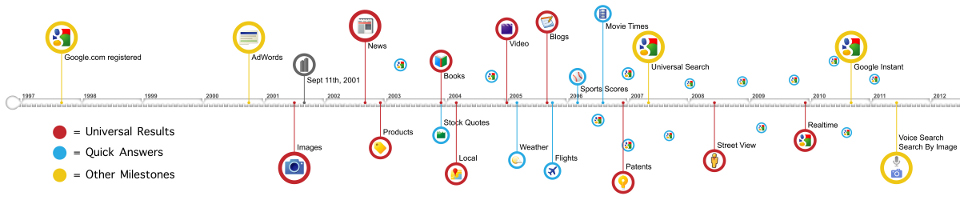
Google Logo The Official Google Blog had an interesting post today about the evolution of search, more specifically, Google search, of course. It is a bit of a look at where Google has been and how it has grown and changed.

Google Search Timeline Watching the video associated with the post was interesting because it reminded me of things I’d long since forgotten. I’m so used to using Google every day, from my PC and my Droid, that it seems like it has always been like it is now. But seeing the old page designs, the changes in the search results page over the years, you realize how far it has come.

I’d totally forgotten what it was like ten years ago when Google only updated roughly each month, so search results we’re always topical. Now I can search on some topics and find blog posts I made just hours earlier. And we completely take it for granted now. When some new event happens how many of us turn to Google, or another search engine, to find the latest stories? That just wasn’t possible ten years ago. I think it is awesome, and I certainly wouldn’t want to go back to the days before Google, Wikipedia, et al.

Posted in Google | Tagged , , | Leave a comment

VM TiVo Net Remote Release for Virgin Media TiVos Running 15.2 – Works In US Too

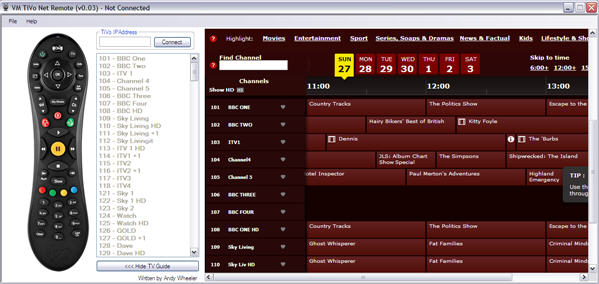
VM TiVo Net Remote One of the new features that is part of the 15.2 software update hitting Virgin Media TiVos in the UK is the Network Remote Control functionality that has been part of the US Series3 and later units for some time now. This functionality is a prerequisite for the iPad app VM has announced is coming, but it also opens things up to third party software.

I’ve posted about software available for US units before, here and here, and on TiVo’s blog, and these apps work with the VM TiVo; but now there is a 3rd party remote control app for Windows .Net specifically for the VM TiVo: VM TiVo Net Remote. It is much more feature-rich than the Python-based TiVoRemote that’s been out for US machines for a while.

I can confirm that it does work with US units, I connected to the Premiere Elite I have for review and it worked as expected. Except for the TV guide, nothing displayed when I selected ‘Show TV Guide’. The window expanded, but it was blank. This is probably hard coded for the UK devices. There is also a default channel list, but that’s stored as a text file that you can edit to match your lineup.

What’s really nice is that anything you type while in the remote window is sent to the TiVo. It makes text entry a breeze. There are also shortcut keys to navigate with:
Following Shortcut keys provide the following functions
CTRL+H - Home
CTRL+T - TV
CTRL+G - TV Guide
CTRL+P - Play
CTRL+S - Stop
CTRL+M - My Shows
CTRL+V - Pause
CTRL+R - Record
CTRL+L - Last Channel
CTRL+I - Info
CTRL+U - Thumbs Up
CTRL+D - Thumbs Down
CTRL+F - Skip
CTRL+B - Skip Back
CTRL+X - Slow
CTRL+LEFT - Rewind
CTRL+RIGHT - Fast Forward
ARROW KEYS - Left/Right/Up/Down
ENTER - OK
DELETE - Clear
+ - Channel Up
- - Channel Down
1 to 9 - Send corresponding Number
A to Z - Send corresponding Key when in a text search (Search TV, YouTube search etc.)

You can click on the image of the TiVo remote in the app to send commands as well, very much like using a Slingbox. The image of the remote is the UK version, but it is close enough that US users shouldn’t have any trouble.

Perhaps some US-based developer could contact the creator, Andy Wheeler, and work with him to create a localized version for the US. What’d really be nice is to see some of the features from the Android TiVo Commander app brought to other platforms. But that’s not to denigrate the work Andy has done. This is a brand new app – version 0.3 was just released on Sunday – and he’s been improving it quickly. He has a thread at TiVoCommunity.com for feedback.

Via the Virgin Media High Definition & TiVo Services blog.

Posted in Blogs, DVR, PC, Software, TiVo | Tagged , , , , , , , , | 7 Comments

I Try Not To Drool As the ASUS Transformer Prime Is Fondled On Video

ASUS Transformer Prime with Dock - Front My technolust is running high where the ASUS Eee Pad Transformer Prime is concerned. The two gizmos I’m trying my best to patiently wait for are this and the Samsung Galaxy Nexus. Hopefully the rumors are true and they’ll both launch in December.

Now blog Ritchie’s Room has gotten their hands on one for review, including a video. This is what they mean by gadget pr0n, I think:

There’s also an earlier video from NVIDIA showing Android 4.0 Ice Cream Sandwich running on the Prime, but it is just a quick tease:

Soon… my precious…

Via Engadget.

Posted in Android, Blogs | Tagged , , , , , , | 3 Comments