Ben Drawbaugh over at EngadgetHD has done a product comparison between the Series3 and TiVo HD that is worth checking out if you’re trying to decide between those two models.
And remember the deals currently available.


Ben Drawbaugh over at EngadgetHD has done a product comparison between the Series3 and TiVo HD that is worth checking out if you’re trying to decide between those two models.
And remember the deals currently available.

The Tomo Report has leaked photos of the forthcoming SlingCatcher’s packaging. They have pictures of the front and back of the box, and a (very, very blurry – someone needs a ‘macro mode’ on their camera) close-up of the system requirements and specifications. Check out their post for all the photos, and click on them for larger versions.
As best I can make out from the blurry close-up:
SLINGCATCHER™ SYSTEM REQUIREMENTS:
- A TV that supports any of: 480i (NTSC), 576i (PAL/SECAM), 480p*, 576p*, 720p*, or 1080i* (Note: SlingCatcher supports streaming from any Slingbox regardless of input video format)
- A broadband Internet connection (DSL/Cable modem)
- Home network router – wired or wireless*
SLINGSYNC™ SYSTEM REQUIREMENTS AND SPECIFICATIONS:
- SlingSync enables you to transfer video and audio files from your PC to SlingCatcher, for playback on your TV
- SlingCatcher requires optional USB 2.0 hard disk drive or USB 2.0 flash memory stick accessory with at least 1GB free space to support SlingSync
- Supported Media Formats
- Video: WMV, MPEG-2, MPEG-4, H.264, Xvid
- Audio: MP2, MP3, WMA, AAC, AC3, PCM
- File formats: .avi, .ts, .ps, .asf, .mpg, .mov, .vob, .wma, .mp4, .mp3, .mp4a, .pcm
The file formats were especially blurry, so I’m not positive I got them right – feel free to correct me in the comments, please. The remote certainly looks interesting – keeping with Sling’s triangle theme. I do wonder how it feels in the hand though. (Packaging leak picked up from EngadgetHD.)
How about what is in the box you ask? Well, SlingCommunity is reporting on yet another leak from the FCC. Some of the documents on the previously reported filing have just been updated. Geeks may enjoy the internal photos and block diagram, while the external photos have that mugshot-under-a-fluorescent-light look. The real interest is the SlingCatcher User Guide.
It looks like the SlingCatcher will come with the remote (and batteries), composite video & analog audio cables, an Ethernet cable, and a power adapter. So we’ll have to supply our own HDMI cables, no surprise. But what is a surprise is on page 2:
Note: For ease-of-use, performance and convenience, Sling Media recommends that you use wired Ethernet or SlingLink™ TURBO to connect SlingCatcher to your home network. Alternatively, you can use SlingLink WIRELESS. It plugs into a USB port on the back of the SlingCatcher and allows you to connect SlingCatcher to your wireless router.
SlingLink TURBO and SlingLink WIRELESS are sold separately.
Visit http://www.slingmedia.com/slinglink for more information.
SlingLink WIRELESS? I believe this is the first we’ve heard of this – though I’m not surprised. I speculated that the USB port on the Slingbox SOLO was meant for a WiFi adapter when it shipped. But, as far as I know, this is the first real confirmation we have that Sling will be shipping a branded WiFi adapter. I think that will make a lot of people happy. And I’m sure some will grumble about a branded adapter and/or that it isn’t built-in. Such is life.
The good news is that, while Sling plans to sell their own USB 2.0 storage devices (drives and flash), you can supply your own as well:
If you want to sync media content from your PC using the SlingCatcher Desktop software, you can connect a USB 2.0 storage device to the back of SlingCatcher. If you purchased a USB 2.0 hard disk drive or USB 2.0 flash drive accessory from Sling Media, or have your own, install it by connecting it to a USB port on the back of SlingCatcher.
SlingCatcher is compatible with most USB 2.0 storage devices. Your device must have at least 1 GB available free space. Devices using USB 1.1 or USB On-the-Go (OTG) are not supported. Your device must also be formatted with the FAT32 file system for use with SlingCatcher. If your device is not formatted correctly, SlingCatcher can format it for you.
So this seems to be getting real, I hope it ships in time for the holiday shopping rush.
The Slingbox SOLO FCC filing has also been updated with the block diagram, internal photos, etc.
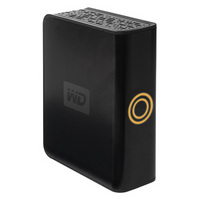
We’ve known for a while that Multi-Room Viewing (MRV) and TiVoToGo (TTG – including TiVoToComeBack, TTCB) have been scheduled for release in November, and that TiVo promised eSATA support by the end of the year. And the recent release of the 9.2 software for the Series3 and TiVo HD announced that it had latent support for eSATA, just waiting to be turned on.
Well, it looks like TiVo might be delivering on those promises a bit early. This morning TiVo and Western Digital both issued press releases announcing TiVo’s eSATA support and Western Digital as the first ‘TiVo Verified’ storage device vendor. Both press releases are below. The first, and so far only, TiVo Verified external storage option is the Western Digital WDG1S5000N aka the 500GB My DVR Expander. This drive will add up to 600 hours of SD capacity, and up to 65 hours of HD capacity.
Until now this drive has been marketed to users of the Scientific Atlanta 8300-series cable DVRs, so it makes sense that the same drive would be used on TiVos. The MSRP is $199.99 and, according to the press releases, it is (or will be) available from Best Buy and online from TiVo.com
. It is also available directly from WesternDigital.com.
What isn’t clear is if this means this is the only drive that will work with the S3 and HD once the feature is officially activated, or if this is the only drive that will be officially supported and endorsed, and that users can use other eSATA drives at their own risk. I’ve asked TiVo about this and I’ll update once I hear back. There have been rumors than the S3 will work with any drive but the HD will be ‘locked down’ to only approved drives. I’m hoping that is not the case. I’ve also asked if it is possible to use drives in the same family, such as the WDG1SU5000, or if it must be the one specific model. An important question as there are differences in pricing and availability.
There is supposed to be more information at www.tivo.com/expand, but as I write this the page is not yet live, it is still a placeholder. It will probably be up later in the morning.
As for MRV & TTG/TTCB, there are no surprises. The functionality is exactly what TiVoPony said it would be back in September. SD transfers between S2/S2DT units, SD & HD transfers between the S3/HD units, but only SD transfers from an S3/HD to an S2/S2DT – which makes perfect sense, the S2/S2DT cannot play HD content. TTG includes transfers of HD content to a PC, and back to a TiVo. I’ve asked TiVo if this means they’ll be turning these features on starting today, or if this announcement is a ‘coming real soon’ kind of thing. I let you know what I hear.
We already knew that 9.2 includes Progressive Downloads, since it is in the boot message users see after their unit upgrades. But this is the official announcement, and it also confirms that this feature is only for the S3 and HD. I don’t understand why this feature would be limited to the S3/HD, and I’m hopeful that it will come to the S2/S2DT in the future. I’ve inquired with TiVo about this and we’ll see what they say.
EDIT: See my follow-up post.
The TiVo and WD press releases are below:
Continue reading
Well, based on my affiliate report, the free TiVo Series2DT offer has certainly sparked interest. It seems quite a number of people are still interested in the Series2DT when it is free. It does make a nice secondary box for other rooms or it is perfect for those without HD or with analog-only cable.
The offer is still running
TiVo Series3 is down to $549.99
And the TiVo HD is just $253.88!
However, if you’re considering a pre-expanded TiVo HD, DVRupgrade is offering a free ‘Glo’ remote with the purchase of an expanded TiVo HD. Just use the coupon code ‘REMOTEFALL2007′ during checkout. Furthermore, DVRupgrade has worked with Hitachi to offer a $30 rebate on kits and units using 1TB Hitachi drives. So order a pre-upgraded TiVo with a 1TB drive, or a 1TB upgrade kit to do-it-yourself, and trim $30 off the cost.
Of course, the $199 lifetime transfer offer on the TiVo HD is still running, and DVRupgrade reports that units purchased from them are eligible. So keep that in mind as well.
And if you plan to use the TiVos on a WiFi network, be sure to pick up a TiVo Wireless G USB Network Adapter for only $37.48.
As always, if you activate a new TiVo and you don’t have someone to use as a referrer, the TiVo Rewards Referrals are appreciated.
And while I’m posting deals, through 11/3 Best Buy has a special promo: Free Toshiba HD-DVD player (shipping extra) with select Toshiba TVs at BestBuy.com.
Remember that any time you shop online if you use the affiliate links on the ‘Support the Site’ page, or the links in the upper-right corner, you help fund the site at no cost to you. Win-win. CES is coming up in January, so it’ll certainly help defray the costs of that trip. Whenever I buy things online (as I often do) I’ll use affiliate links from sites I frequent just to help support the site. Every little bit helps – thank you.
Josh from Blu-ray.com paid a visit to Disney’s Magical Blu-ray Tour when it hit Tysons Corner Center in McLean, VA on Saturday. He’s posted quite a detailed write-up with a number of photos, if you want to see how Disney is pitching Blu-ray to the masses on this tour.






